The First National Bank is a full-service subsidiary of FirstRand Group. First National Bank, is a comprehensive corporate and investment banking area that offers its corporate customers a comprehensive range of innovative solutions tailor-made for their respective banking needs. FNB team serves local and multinational corporate clients in every country that it exists in, and it offers a complete range of corporate and investment banking products and services.
For FNB (First National Bank) customers who may have forgotten their online banking username, there’s no need to worry. FNB provides a straightforward process to retrieve your username and regain access to your online banking account. In this article, we’ll guide you through the step-by-step process of retrieving your FNB online banking username, ensuring a seamless experience.
How to Find FNB Online Banking Username Using Mobile App
Steps to Finding FBN Online Username
Log in to FNB mobile app: The initial step in the process of step in finding your FNB username is by opening the FNB mobile app. This app can be downloaded from Google Plays Store.
After the app is opened, go to the top left screen on the hamburger menu.
Once you click on the hamburger menu, go to the drop-down menu and scroll down all the way to “settings” and click on it.
Click on “My Username”: Here, your username will appear on the username tab, and should you wish to, you can change it wherever you feel the need to do so.
How to Find FNB Online Banking Username Via Online Banking Portal
Step 1: Accessing the FNB Online Banking Portal
To initiate the process of retrieving your FNB online banking username, begin by opening a web browser and visiting the FNB website. Look for the online banking login section, typically located prominently on the homepage. Click on the “Login” or “Online Banking” button to proceed.
Step 2: Navigating to the Username Retrieval Option
Once you have reached the FNB online banking login page, you’ll need to locate the option for username retrieval. Depending on the website layout, this may be displayed as a “Forgot Username” or similar link. Click on this option to proceed to the next step.
Step 3: Verifying Your Identity for Security Purposes
To ensure the security of your account, FNB will ask you to verify your identity during the username retrieval process. This typically involves providing personal details, such as your ID number or passport number, as well as additional information like your email address or cell phone number linked to your FNB account. Enter the requested information accurately and proceed to the next step.
Step 4: Selecting the Account Linked to Your Username
If you have multiple accounts with FNB, you will be prompted to select the specific account associated with the username you wish to retrieve. Carefully review the account options presented and choose the appropriate one. Click “Next” or a similar option to proceed.
Step 5: Answering Security Questions to Confirm Ownership
In order to further confirm your ownership of the account, FNB may require you to answer security questions that you previously set up. These questions are designed to be known only by you, adding an extra layer of protection to your account. Provide accurate and consistent answers to the questions to continue with the username retrieval process.
Step 6 (Optional): Choosing a New Username
At this stage, FNB may give you the option to select a new username for your online banking account. If you wish to change your username, follow the provided instructions to enter a new username that meets FNB’s requirements. If you prefer to keep your existing username, you can skip this step and proceed to the next.
Step 7: Reviewing and Confirming Your Username Retrieval
Once you have completed the necessary steps, FNB will display a summary of the information you provided. Take a moment to review the details carefully, ensuring that everything is accurate and in order. If you need to make any changes, follow the provided instructions. If all the information is correct, confirm your username retrieval request.
Step 8: Accessing Your FNB Online Banking Account
After confirming your username retrieval, FNB will process your request and provide instructions for accessing your online banking account. This usually involves logging in with your retrieved username and your existing password. Follow the instructions provided, and upon successful login, you will have full access to your FNB online banking account.
Successfully Retrieving Your FNB Online Banking Username
Retrieving your FNB online banking username is a simple process that ensures you regain access to your account efficiently and securely. By following the step-by-step instructions outlined in this article, you can navigate the FNB online banking portal, verify your identity, answer security questions, and confirm your username retrieval. With your username recovered, you can resume managing your finances
A routing number is a 9-digit code that identifies a financial institution in the United States. It is used for routing money transfers and other financial transactions between banks, credit unions, and other financial institutions. The routing number is also known as an ABA (American Bankers Association) routing code or RTN (Routing Transit Number), and it can be easily located on the bottom of a check or in the online banking portals of financial institutions. The routing number is an important piece of information when transferring money or making payments online. It helps to ensure that the money is sent to the right place and with the correct details. Knowing your bank’s routing number can also help you ensure you are sending money to the right account.
When you send or receive funds directly from your bank account in transactions such as electronic payments, the bank must know where the funds are supposed to go. The routing number identifies the financial institution where your funds are held and indicates where to send funds that are owed to you. Employers need your routing number to establish payment systems such as a direct deposit.
Typically, banks and financial institutions have multiple routing numbers that serve distinct purposes, geographic regions, and branches. Before initiating a money transfer, it is crucial to ensure that the correct routing number is utilized.
Our database contains more than 20,000 unique routing numbers. This platform is solely for educational purposes. Even though every effort is made to provide accurate information, users must understand that this website is not responsible for how accurate the information is. Only your bank can confirm the accuracy of your bank account details. If you are making an important, time-sensitive payment, you should contact your bank beforehand.
Where is the routing number on a check?
routing number on a check
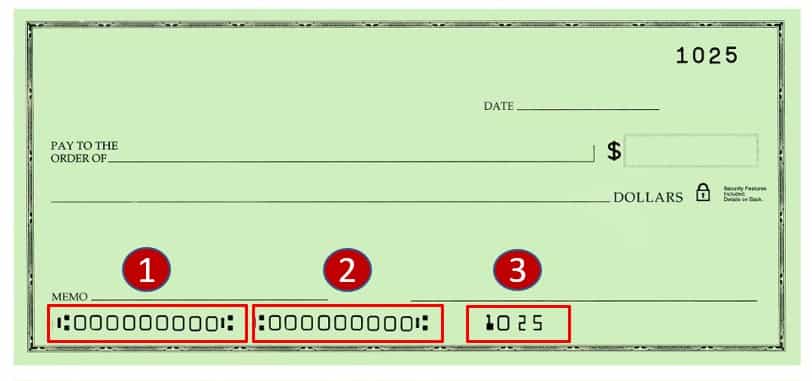
What numbers appear on a check? You will find 3 groups of numbers at the bottom of a check. The first group contains the routing number, the second is the account number, and the third is the check number.
The routing number, which is the first set of numbers in the lower left corner of a check are nine-digit code, and the character symbol surrounding the numbers is not part of the routing number. Routing numbers, also known as transit numbers, are public and may vary depending on the region where your account was opened.
It is helpful to know where to find these numbers when setting up automatic payments for monthly bills and filling out forms for actions such as a direct deposit. Below is more information about routing numbers.
NOTE: In some cases, the order of the checking account number and check serial number is reversed.
When do you need the Zenith Bank routing number?
The Zenith Bank routing number is required in a variety of situations, including setting up direct deposit, automatic loan payments, or recurring transfers like bill payments.
You’ll also need it when you file taxes to receive your tax refund or debit a tax payment, or when you conduct Automated Clearing House (ACH), transfers between different bank accounts.
Generally, you’ll only need your routing number when funds are being directly transferred to or from your bank account — a routing number is never for debit card or credit card purchases.
This number is also used to set up an online account with your bank to be used with personal finance and accounting software.
Zenith Bank routing numbers
Make use of the “Search” box to narrow your results by city, state, address, or routing number. You can view all of the information pertaining to the routing number by clicking on the link that is located in the table below (address, telephone number, zip code, etc.).
No.
ZENITH BANK ROUTING NUMBERS
COUNTRY
ZENITH BRANCHES
1
057230014
Nigeria
ABA
2
057210021
Nigeria
ABA ROAD
3
057330011
Nigeria
ABAKALIKI
4
057170019
Nigeria
ABEOKUTA
5
057080015
Nigeria
ABUJA
6
057150657
Nigeria
ABULE EGBA
7
057150709
Nigeria
ACME ROAD
8
057150343
Nigeria
ADENIRAN OGUNSANYA
9
057150204
Nigeria
ADETOKUNBO ADEMOLA
10
057150547
Nigeria
ADEYEMO ALAKIJA
11
057340014
Nigeria
ADO-EKITI
12
057150686
Nigeria
AGBARA
13
057190044
Nigeria
AGBENI MARKET
14
057240033
Nigeria
AGBOR
15
057150521
Nigeria
AGIDINGBI
16
057150437
Nigeria
AGUDA
17
057080099
Nigeria
AHMADU BELLO WAY
18
057150372
Nigeria
AIRPORT ROAD
19
057010030
Nigeria
AKA ROAD
20
057150288
Nigeria
AKIN ADESOLA
21
057150660
Nigeria
AKOWONJO
22
057180012
Nigeria
AKURE
23
057150576
Nigeria
ALABA INTERNATIONAL
24
057150165
Nigeria
ALLEN AVENUE
25
057150754
Nigeria
ALLEN II
26
057080044
Nigeria
AMINU KANO 1
27
057080109
Nigeria
AMINU KANO 2
28
057150615
Nigeria
AMUWO ODOFIN
29
057150505
Nigeria
ANTHONY
30
057150055
Nigeria
APAPA
31
057150835
Nigeria
APAPA RD
32
057230030
Nigeria
ASA ROAD
33
057240020
Nigeria
ASABA
34
057040055
Nigeria
AUCHI
35
057020046
Nigeria
AWKA
36
057150550
Nigeria
BAR BEACH
37
057030010
Nigeria
BAUCHI
38
057040013
Nigeria
BENIN
39
057040042
Nigeria
BENINAIRPORTRD
40
057160032
Nigeria
BIDA
41
057270016
Nigeria
BIRNIN KEBBI
42
057210047
Nigeria
BONNY ISLAND
43
057150275
Nigeria
BOURDILLON
44
057150631
Nigeria
BROAD STREET
45
057200028
Nigeria
BUKURU
46
057080060
Nigeria
LAW SCHOOL (BWARI)
47
057070012
Nigeria
CALABAR
48
057150725
Nigeria
CATHOLIC MISSION ST.
49
057080073
Nigeria
CENTRAL BUS. DISTRICT
50
057150301
Nigeria
TRINITY
51
057150107
Nigeria
COKER
52
057150848
Nigeria
COMPUTER VILLAGE
53
057150330
Nigeria
CREEK ROAD
54
057310015
Nigeria
DAMATURU
55
057150194
Nigeria
DOPEMU
56
057260013
Nigeria
DUTSE
57
057150712
Nigeria
EJIGBO
58
057010027
Nigeria
EKET
59
057040068
Nigeria
EKPOMA
60
057250010
Nigeria
ENUGU 1
61
057250023
Nigeria
ENUGU 2 (OGUI RD)
62
057150220
Nigeria
ERIC MOORE
63
057250036
Nigeria
ESTATE LAYOUT
64
057240062
Nigeria
EZENEI AVENUE
65
057150217
Nigeria
FALOMO
66
057150233
Nigeria
FESTAC
67
057130020
Nigeria
FUNTUA
68
057080028
Nigeria
GARKI
69
057150738
Nigeria
GBAGADA
70
057350017
Nigeria
GOMBE
71
057370013
Nigeria
GUSAU
72
057080112
Nigeria
GWAGWALADA
73
057150602
Nigeria
H/O ANNEX II
74
057150796
Nigeria
H/O ANNEX III
75
057020033
Nigeria
BRIDGE HEAD
76
057150013
Nigeria
HEAD OFFICE
77
057150424
Nigeria
HERBERT MACAULEY
78
057190015
Nigeria
IBADAN
79
057190031
Nigeria
IBADAN 3
80
057150851
Nigeria
IDIMU
81
057150741
Nigeria
IDI-ORO
82
057150039
Nigeria
IDUMAGBO
83
057150026
Nigeria
IDUMOTA
84
057170022
Nigeria
IJEBU ODE
85
057150534
Nigeria
IJU
86
057150042
Nigeria
IKEJA
87
057150314
Nigeria
IKEJA GRA
88
057070038
Nigeria
IKOM
89
057150385
Nigeria
IKORODU
90
057150644
Nigeria
IKORODU ROAD
91
057010043
Nigeria
IKOT EKPENE ROAD
92
057150479
Nigeria
IKOTA
93
057150518
Nigeria
IKOTA SHOPPING COMPLEX
94
057150136
Nigeria
IKOYI
95
057040026
Nigeria
IKPOBA HILL
96
057210034
Nigeria
IKWERRE ROAD
97
057290025
Nigeria
ILE-IFE
98
057290038
Nigeria
ILESA
99
057140010
Nigeria
ILORIN
100
057150123
Nigeria
ILUPEJU
101
057150408
Nigeria
INT’L AIRPORT TERMINAL
102
057150084
Nigeria
ISOLO
103
057190028
Nigeria
IWO ROAD
104
057300012
Nigeria
JALINGO
105
057200015
Nigeria
JOS
106
057110011
Nigeria
KADUNA
107
057110037
Nigeria
KADUNA 2
108
057110040
Nigeria
KAFANCHAN
109
057120014
Nigeria
KANO
110
057120027
Nigeria
KANO 2
111
057130017
Nigeria
KATSINA
112
057150864
Nigeria
KETU
113
057150877
Nigeria
KINGSWAY
114
057150291
Nigeria
KOFO ABAYOMI
115
057160045
Nigeria
KOTANGORA
116
057360010
Nigeria
LAFIA
117
057150178
Nigeria
LAGOS CENTRAL
118
057080125
Nigeria
BWARI
119
057150699
Nigeria
LAWANSON
120
057150398
Nigeria
LEKKI
121
057150880
Nigeria
LIVERPOOL
122
057280019
Nigeria
LOKOJA
123
057150770
Nigeria
MAGODO
124
057060019
Nigeria
MAIDUGURI
125
057060022
Nigeria
MAIDUGURI 2
126
057050016
Nigeria
MAKURDI
127
057080057
Nigeria
MARARABA
128
057150068
Nigeria
MARINA
129
057150628
Nigeria
MARINA II
130
057150071
Nigeria
MATORI
131
057150453
Nigeria
MEDICAL ROAD
132
057160016
Nigeria
MINNA
133
057150822
Nigeria
MOLONEY
134
057090021
Nigeria
MUBI
135
057150589
Nigeria
MURI OKUNOLA
136
057020059
Nigeria
NKPOR
137
057210050
Nigeria
NNAMDI AZIKWE(OGINIBA)
138
057020020
Nigeria
NNEWI
139
057250052
Nigeria
NSUKKA
140
057280022
Nigeria
OBAJANA
141
057140023
Nigeria
OFFA
142
057150110
Nigeria
OGBA
143
057020075
Nigeria
OGIDI
144
057070025
Nigeria
OGOJA
145
057150466
Nigeria
OGUDU
146
057150356
Nigeria
OGUNLANA DRIVE
147
057150893
Nigeria
OJODU
148
057040084
Nigeria
OKADA
149
057150181
Nigeria
OKE ARIN
150
057100021
Nigeria
OKIGWE
151
057150411
Nigeria
OKOTA
152
057150440
Nigeria
OLD OJO ROAD
153
057150369
Nigeria
OLOSA
154
057150783
Nigeria
OLOWU
155
057020017
Nigeria
ONITSHA
156
057210076
Nigeria
ONNE
157
057150259
Nigeria
OPEBI
158
057150246
Nigeria
OREGUN
159
057290012
Nigeria
OSHOGBO
160
057100018
Nigeria
OWERRI
161
057150767
Nigeria
OZUMBA MBADIWE
162
057210089
Nigeria
OYIGBO
163
057040071
Nigeria
SAPELE ROAD
164
057150327
Nigeria
PALM AVENUE
165
057150903
Nigeria
PEN CINEMA
166
057210018
Nigeria
PORT HARCOURT
167
057250065
Nigeria
PRESIDENTIAL ROAD
168
057020062
Nigeria
RELIEF MARKET
169
057210063
Nigeria
RUMUIBEKWE
170
057120030
Nigeria
SABON-GARI
171
057150495
Nigeria
SANGO OTA
172
057150592
Nigeria
SANUSI FAFUNWA
173
057240046
Nigeria
SAPELE
174
057170035
Nigeria
SHAGAMU
175
057220011
Nigeria
SOKOTO
176
057150563
Nigeria
ST. FINBARRS ROAD
177
057160029
Nigeria
SULEJA
178
057150097
Nigeria
SURULERE
179
057150673
Nigeria
TEJUOSHO
180
057150262
Nigeria
TRADE FAIR
181
057080086
Nigeria
TRANSCORP HILTON
182
057230027
Nigeria
UMUAHIA
183
057120043
Nigeria
UNITY ROAD
184
057040039
Nigeria
USELU
185
057080138
Nigeria
JABI
186
057080141
Nigeria
UTAKO
187
057010014
Nigeria
UYO
188
057150149
Nigeria
VICTORIA ISLAND
189
057240017
Nigeria
WARRI
190
057240059
Nigeria
WARRI II
191
057150152
Nigeria
WHARF RD
192
057080031
Nigeria
WUSE
193
057150055
Nigeria
SNAKE ISLAND
194
057320018
Nigeria
YENAGOA
195
057090018
Nigeria
YOLA
196
057110024
Nigeria
ZARIA
197
057250049
Nigeria
ZIK AVENUE
198
057150806
Nigeria
ALUMINIUM VILLAGE
199
057150819
Nigeria
GBAGADA 2
200
057150916
Nigeria
LASU
201
057050029
Nigeria
OTUKPOR
202
057240075
Nigeria
ABRAKA
203
057080154
Nigeria
EFAB
204
057150929
Nigeria
FALOMO R/ABOUT
205
057150932
Nigeria
ADENIYI JONES
206
057150945
Nigeria
MOBIL ROAD
207
057150958
Nigeria
SANGO OTA 2
208
057190057
Nigeria
BODIJA
209
057150961
Nigeria
LEKKI EXPRESSWAY
210
057080167
Nigeria
MAITAMA 2
211
057210092
Nigeria
ABA ROAD 2
212
057210102
Nigeria
AZIKIWE ROAD, P/H
213
057030023
Nigeria
AZARE
214
057150974
Nigeria
LASPOTECH
215
057150987
Nigeria
EPE
216
057080170
Nigeria
GARKI MODEL MKT
217
057210115
Nigeria
OMOKU
218
057100034
Nigeria
AZIKIWE ROAD,P/H ORLU
219
057330024
Nigeria
AFIKPO
220
057150990
Nigeria
KUDIRAT ABIOLA WAY
221
057151009
Nigeria
BOLADE OSHODI
222
057120056
Nigeria
HOTORO
223
057151012
Nigeria
ILUPEJU 2
224
057080183
Nigeria
CENTRAL BUS. DISTR 2
225
057330024
Nigeria
NEW WUSE
226
057040097
Nigeria
UNIBEN
227
057040107
Nigeria
SAKPOBA ROAD
228
057040110
Nigeria
EKENWA ROAD
229
057151025
Nigeria
BADAGRY
230
057180025
Nigeria
ONDO TOWN
231
057151038
Nigeria
ASPAMDA
232
057060035
Nigeria
MAIDUGURI 3
233
057310028
Nigeria
POTISKUM
234
057120069
Nigeria
WUDIL
235
057080206
Nigeria
FED SECRETARIAT
236
057151041
Nigeria
ALAGBADO
237
057151054
Nigeria
TRINITY 2
238
057020088
Nigeria
EKWULOBIA
239
057151067
Nigeria
KEFFI
240
057151070
Nigeria
SATELLITE TOWN
241
057240088
Nigeria
UGHELLI
242
057020091
Nigeria
UMUNZE
243
057040123
Nigeria
MISSION ROAD
244
057080219
Nigeria
KUBWA
245
057040136
Nigeria
UROMI
246
057100047
Nigeria
OWERRI
247
057151083
Nigeria
OGBA 2
248
057151096
Nigeria
IKOTUN
249
057151106
Nigeria
AGEGE MOTOR RD
250
057151119
Nigeria
EBUTE-ERO
251
057140036
Nigeria
ILORIN 2
252
057230043
Nigeria
ABA 3
253
057080222
Nigeria
DEI-DEI
254
057080235
Nigeria
NATIONAL ASSEMBLY
255
057010046
Nigeria
UYO 3
256
057151122
Nigeria
AKUTE
257
057151135
Nigeria
SEME-BORDER
258
057080248
Nigeria
DUTSE ALHAJI
259
057080251
Nigeria
ENUGU HOUSE ABUJA
260
057190060
Nigeria
OYO TOWN
261
057190073
Nigeria
OLUYOLE
262
057170048
Nigeria
OWODE
263
057330024
Nigeria
ABAKALIKI 2
264
057020101
Nigeria
ELECTRONIC MRKT
265
057080264
Nigeria
GWARIMPA
266
057080277
Nigeria
KEBBI HOUSE
267
057080280
Nigeria
MAPAPE
268
057280035
Nigeria
OKENE
269
057080293
Nigeria
EAGLE
270
057200031
Nigeria
JOS 2
271
057070041
Nigeria
MARY SLESSOR
272
057170051
Nigeria
OKE ILEWO
273
057240091
Nigeria
PTI ROAD
274
057151148
Nigeria
LADIPO OLUWOLE
275
057151151
Nigeria
ALAUSA
276
057120072
Nigeria
KOFAR RUWA
277
057300025
Nigeria
WUKARI
278
057080303
Nigeria
SULTAN ABUBUKAR
ABA check routing number digits meaning
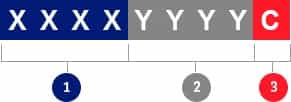
The numbers that comprise a routing number can be broken down into 3 parts, each of which has a distinct meaning.
rtn content
First 4 digits: The first 4 numbers represent the Federal Reserve Routing Symbol. There are 12 Federal Reserve Banks throughout the US that service a geographic area/district).
Digits 5 to 8: These are also known as ABA Institution Identifier, these numbers indicate which bank or financial institution within the Federal Reserve District.
9th digit: This is the “check digit“. It’s used to verify if a routing number is valid using a mathematical formula.
How to find your Zenith Bank routing number (ABA/RTN)
The following is a list of the various options available to you for locating your Zenith Bank ABA routing number:
Routing Numberssection of this website: The majority of the major banks in the United States are listed above; you can begin your search there.
Online banking portal: You will be able to get the routing number for your bank by logging into your online banking account.
Paper check or bank statement: Checks issued by a bank or bank statements. Check the lower left corner of your check.
Bank customer service: You’ll be able to get your routing number by contacting your bank’s customer service staff
Always check with your bank or the recipient to ensure that the correct routing number has been provided so that the payment can be processed quickly and safely by your bank.
What is the Automated Clearing House (ACH) number?
The Automated Clearing House, also known as ACH, is an electronic payment delivery system that enables users to electronically send and receive payments as well as collect funds through a network known as ACH. ACH transactions are usually next-day entries when exchanged with other financial institutions. Direct deposits and the conversion of paper checks to electronic versions are both examples of ACH functions.ACHs were developed to handle high volumes of low-value transactions and charge fees that are competitively priced to encourage the use of the system for the transfer of such transactions. The software was developed to support the acceptance of payment batches, which enables a large number of payments to be processed all at once.
Differences between FedACH & FedWire credit transfers
Accordingly, the following is a comparison of some of the key distinctions that can be made between ACH credit transfers and FedWire credit transfers in the United States.
Availability: ACH transfers can only be used for financial dealings within the same country. If you want to send money to a foreign country using the ACH network, you will need to make use of an international wire transfer.
Security: Both types of transfers provide additional layers of protection than what is available when you send a check in the mail. Due to the fact that banking information is encrypted while being transferred, financial institutions that process wire and ACH transfers offer an additional layer of protection to their customers. Before either kind of transfer can be finalized, a series of steps must first be taken to verify the sender’s identity or the recipient’s banking information. Despite these precautions, however, mistakes and fraudulent activity can still take place. Canceling a wire transfer is typically a race against the clock because it is processed much more quickly than ACH transfers and is considered complete once the funds have been received. ACH transfers can be stopped.
Transfer limits: Both ACH and wire transfers have daily transfer limits that must be adhered to. Confirm this with your financial institution, such as your bank or credit union.
Processing times: The processing of an ACH transfer can take anywhere from one to several business days, whereas the majority of wire transfers are completed within one business day.
Posting times: The recipient of a wire transfer can access the funds as soon as they are deposited into their account. ACH transfers are carried out in a slightly different manner: the funds will be shown as “pending” status and won’t be made available to you for use until the ACH system has been fully cleared. There is a possibility that this will take up to three business days.
Reversals: If there was an error with your ACH transfer, the good news is that you might be able to reverse the transaction by submitting a request for it. Above all, wire transfers, on the other hand, do not provide this luxury and, once the transaction is started, it cannot be reversed.
Fees: You should budget anywhere from $10 to $35 for the fee associated with each wire transfer that you start. There is a possibility that recipients will be required to pay a small fee for incoming wire transfers. The vast majority of ACH transfers are free, but there may be a fee associated with expedited bill pay services or transfers to banks located outside of the United States.Difference between routing numbers, SWIFT/BIC codes, IBANs, and sort codes
If you want to send or receive money through your bank, you will most likely come across some terms that you are unfamiliar with, such as the SWIFT / BIC code, the IBAN, and the sort code. What do each of these acronyms stand for, and what do people typically refer to them as? However, each one is necessary for certain circumstances due to the fact that various countries and banks have varying procedures and requirements. Although they all appear to do essentially the same thing, which is to assist banks in determining where your money needs to go when it is being transferred, the reality is that they do not.When processing domestic ACH payments or wire transfers in the United States, routing numbers, which are nine-digit codes, are used to identify individual banks. When making payments in countries other than the United States, you do not need to provide these.SWIFT / BIC codes are unique identifiers that can be used by banks and other financial institutions all over the world. These codes can have either 8 or 11 digits. In contrast to routing numbers, these codes are utilized for financial transactions that take place on a global scale.IBANs, or international bank account numbers, are a means by which a country, a financial institution, and individual bank accounts can be uniquely identified. The majority of banks in the Eurozone are the ones to issue them, but financial institutions in other regions are beginning to follow suit.Sort Codes Sort Codes are 6-digit numbers that identify the bank and the branch where a bank account is held. These numbers are used for domestic transfers.Note: This website provides a quick and easy way to search & find routing numbers for banks and other financial institutions in the United States. If you’re not sure which routing number to use contact your bank directly. You can call your bank using the phone number listed on your debit/credit card or send a message through your online banking system. Using the wrong routing number can lead to delays in processing the transfer.
About Our Codes
Based on our comprehensive database of more than 100,000 unique numbers/codes. This site is only available for informational purposes. Users need to know that while every effort is made to provide accurate information, this website does not guarantee that it is correct. The accuracy of the bank account information can only be verified by your bank. We advise getting in touch with your bank before making a time-sensitive, important payment.
A routing number is a 9-digit code that identifies a financial institution in the United States. It is used for routing money transfers and other financial transactions between banks, credit unions, and other financial institutions. The routing number is also known as an ABA (American Bankers Association) routing code or RTN (Routing Transit Number), and it can be easily located on the bottom of a check or in the online banking portals of financial institutions. The routing number is an important piece of information when transferring money or making payments online. It helps to ensure that the money is sent to the right place and with the correct details. Knowing your bank’s routing number can also help you ensure you are sending money to the right account.
When you send or receive funds directly from your bank account in transactions such as electronic payments, the bank must know where the funds are supposed to go. The routing number identifies the financial institution where your funds are held and indicates where to send funds that are owed to you. Employers need your routing number to establish payment systems such as a direct deposit.
Typically, banks and financial institutions have multiple routing numbers that serve distinct purposes, geographic regions, and branches. Before initiating a money transfer, it is crucial to ensure that the correct routing number is utilized.
Our database contains more than 20,000 unique routing numbers. This platform is solely for educational purposes. Even though every effort is made to provide accurate information, users must understand that this website is not responsible for how accurate the information is. Only your bank can confirm the accuracy of your bank account details. If you are making an important, time-sensitive payment, you should contact your bank beforehand.
Where is the routing number on a check?
routing number on a check
What numbers appear on a check? You will find 3 groups of numbers at the bottom of a check. The first group contains the routing number, the second is the account number, and the third is the check number.
Amalgamated Banks of South Africa (ABSA Group Limited), is a South African financial services corporation. Their services range from, offering personal and business banking, and credit cards. They also deal with corporate and investment banking, wealth and investment management, and bank assurance. Read Access Bank Nigeria Routing number which you can use when sending your international funds.
Many customers always suffer the cumbersome process of looking for Routing Numbers in the quest to transfer and receive funds. This article will solve the problem of ABSA South Africa Routing Number inquiries.
It is quite interesting to note that Routing numbers are not only needed for wire transfers but also when reordering checks, payment of consumer bills, and establishing a direct deposit. Routing makes it possible International transactions.
Routing With ABSA
When receiving payments in your ABSA account this is the information your sender should be provided with; The code for ABSA is 632005 which is the Amalgamated Banks of South Africa Routing number then followed by your account number, name, and address details which are related to the account. The purpose of Payment comes at the end.
The ABSA’s Bank Identifier Code (BIC), is ABSAZAJJ. This is important for international wire transfers. It becomes very easy to receive your money within minutes from different parts of the world. Some people still end up confusing sort code, especially which is an important number that helps to identify the type of bank itself, when transferring funds internationally from one country account holder and branch to another bank that’s based in a foreign country.
Hopefully, you have managed to find this article helpful and learned about the sort code or Routing Number for Amalgamated Banks of South Africa. Don’t forget to double-check the code before initiating any transfer from your bank to another bank just to avoid complications. Note: International transfers take between 3 – 5 days. Sometimes this is before your account gets credited.
When do you need the Amalgamated Banks of South Africa routing number?
The Amalgamated Banks of South Africa routing number is required in a variety of situations, including setting up direct deposit, automatic loan payments, or recurring transfers like bill payments.
You’ll also need it when you file taxes to receive your tax refund or debit a tax payment, or when you conduct Automated Clearing House (ACH), transfers between different bank accounts.
Generally, you’ll only need your routing number when funds are being directly transferred to or from your bank account — a routing number is never for debit card or credit card purchases.
This number is also used to set up an online account with your bank to be used with personal finance and accounting software.
Amalgamated Banks of South Africa routing numbers
We recommend you view the below table in desktop view because, on mobile, you won’t be able to view the complete details.
Make use of the “Search” box to narrow your results by city, state, address, or routing number. You can view all of the information pertaining to the routing number by clicking on the link that is located in the table below (address, telephone number, zip code, etc.).
ABA check routing number digits meaning
The numbers that comprise a routing number can be broken down into 3 parts, each of which has a distinct meaning.
rtn content
First 4 digits: The first 4 numbers represent the Federal Reserve Routing Symbol. There are 12 Federal Reserve Banks throughout the US that service a geographic area/district).
Digits 5 to 8: These are also known as ABA Institution Identifier, these numbers indicate which bank or financial institution within the Federal Reserve District.
9th digit: This is the “check digit“. It’s used to verify if a routing number is valid using a mathematical formula.
How to find your Amalgamated Banks of South Africa routing number (ABA/RTN)
The following is a list of the various options available to you for locating your Amalgamated Banks of South Africa ABA routing number:
Routing Numberssection of this website: The majority of the major banks in the United States are listed above; you can begin your search there.
Online banking portal: You will be able to get the routing number for your bank by logging into your online banking account.
Paper check or bank statement: Checks issued by a bank or bank statements. Check the lower left corner of your check.
Bank customer service: You’ll be able to get your routing number by contacting your bank’s customer service staff
Always check with your bank or the recipient to ensure that the correct routing number has been provided so that the payment can be processed quickly and safely by your bank.
What is the Automated Clearing House (ACH) number?
The Automated Clearing House, also known as ACH, is an electronic payment delivery system that enables users to electronically send and receive payments as well as collect funds through a network known as ACH. ACH transactions are usually next-day entries when exchanged with other financial institutions. Direct deposits and the conversion of paper checks to electronic versions are both examples of ACH functions.
ACHs were developed to handle high volumes of low-value transactions and charge fees that are competitively priced to encourage the use of the system for the transfer of such transactions. The software was developed to support the acceptance of payment batches, which enables a large number of payments to be processed all at once.
Differences between FedACH & FedWire credit transfers
Accordingly, the following is a comparison of some of the key distinctions that can be made between ACH credit transfers and FedWire credit transfers in the United States.
Availability: ACH transfers can only be used for financial dealings within the same country. If you want to send money to a foreign country using the ACH network, you will need to make use of an international wire transfer.
Security: Both types of transfers provide additional layers of protection than what is available when you send a check in the mail. Due to the fact that banking information is encrypted while being transferred, financial institutions that process wire and ACH transfers offer an additional layer of protection to their customers. Before either kind of transfer can be finalized, a series of steps must first be taken to verify the sender’s identity or the recipient’s banking information. Despite these precautions, however, mistakes and fraudulent activity can still take place. Canceling a wire transfer is typically a race against the clock because it is processed much more quickly than ACH transfers and is considered complete once the funds have been received. ACH transfers can be stopped.
Transfer limits: Both ACH and wire transfers have daily transfer limits that must be adhered to. Confirm this with your financial institution, such as your bank or credit union.
Processing times: The processing of an ACH transfer can take anywhere from one to several business days, whereas the majority of wire transfers are completed within one business day.
Posting times: The recipient of a wire transfer can access the funds as soon as they are deposited into their account. ACH transfers are carried out in a slightly different manner: the funds will be shown as “pending” status and won’t be made available to you for use until the ACH system has been fully cleared. There is a possibility that this will take up to three business days.
Reversals: If there was an error with your ACH transfer, the good news is that you might be able to reverse the transaction by submitting a request for it. Above all, wire transfers, on the other hand, do not provide this luxury and, once the transaction is started, it cannot be reversed.
Fees: You should budget anywhere from $10 to $35 for the fee associated with each wire transfer that you start. There is a possibility that recipients will be required to pay a small fee for incoming wire transfers. The vast majority of ACH transfers are free, but there may be a fee associated with expedited bill pay services or transfers to banks located outside of the United States.
Difference between routing numbers, SWIFT/BIC codes, IBANs, and sort codes
If you want to send or receive money through your bank, you will most likely come across some terms that you are unfamiliar with, such as the SWIFT / BIC code, the IBAN, and the sort code. What do each of these acronyms stand for, and what do people typically refer to them as? However, each one is necessary for certain circumstances due to the fact that various countries and banks have varying procedures and requirements. Although they all appear to do essentially the same thing, which is to assist banks in determining where your money needs to go when it is being transferred, the reality is that they do not.
When processing domestic ACH payments or wire transfers in the United States, routing numbers, which are nine-digit codes, are used to identify individual banks. When making payments in countries other than the United States, you do not need to provide these.
SWIFT / BIC codes are unique identifiers that can be used by banks and other financial institutions all over the world. These codes can have either 8 or 11 digits. In contrast to routing numbers, these codes are utilized for financial transactions that take place on a global scale.
IBANs, or international bank account numbers, are a means by which a country, a financial institution, and individual bank accounts can be uniquely identified. The majority of banks in the Eurozone are the ones to issue them, but financial institutions in other regions are beginning to follow suit.
Sort Codes Sort Codes are 6-digit numbers that identify the bank and the branch where a bank account is held. These numbers are used for domestic transfers.
Note: This website provides a quick and easy way to search & find routing numbers for banks and other financial institutions in the United States. If you’re not sure which routing number to use contact your bank directly. You can call your bank using the phone number listed on your debit/credit card or send a message through your online banking system. Using the wrong routing number can lead to delays in processing the transfer.
About Our Codes
Based on our comprehensive database of more than 100,000 unique numbers/codes. This site is only available for informational purposes. Users need to know that while every effort is made to provide accurate information, this website does not guarantee that it is correct. The accuracy of the bank account information can only be verified by your bank. We advise getting in touch with your bank before making a time-sensitive, important payment.
A routing number is a 9-digit code that identifies a financial institution in the United States. It is used for routing money transfers and other financial transactions between banks, credit unions, and other financial institutions. The routing number is also known as an ABA (American Bankers Association) routing code or RTN (Routing Transit Number), and it can be easily located on the bottom of a check or in the online banking portals of financial institutions. The routing number is an important piece of information when transferring money or making payments online. It helps to ensure that the money is sent to the right place and with the correct details. Knowing your bank’s routing number can also help you ensure you are sending money to the right account.
When you send or receive funds directly from your bank account in transactions such as electronic payments, the bank must know where the funds are supposed to go. The routing number identifies the financial institution where your funds are held and indicates where to send funds that are owed to you. Employers need your routing number to establish payment systems such as a direct deposit.
Typically, banks and financial institutions have multiple routing numbers that serve distinct purposes, geographic regions, and branches. Before initiating a money transfer, it is crucial to ensure that the correct routing number is utilized.
Our database contains more than 20,000 unique routing numbers. This platform is solely for educational purposes. Even though every effort is made to provide accurate information, users must understand that this website is not responsible for how accurate the information is. Only your bank can confirm the accuracy of your bank account details. If you are making an important, time-sensitive payment, you should contact your bank beforehand.
Where is the routing number on a check?
routing number on a check
What numbers appear on a check? You will find 3 groups of numbers at the bottom of a check. The first group contains the routing number, the second is the account number, and the third is the check number.
The routing number, which is the first set of numbers in the lower left corner of a check are nine-digit code, and the character symbol surrounding the numbers is not part of the routing number. Routing numbers, also known as transit numbers, are public and may vary depending on the region where your account was opened.
It is helpful to know where to find these numbers when setting up automatic payments for monthly bills and filling out forms for actions such as a direct deposit. Below is more information about routing numbers.
NOTE: In some cases, the order of the checking account number and check serial number is reversed.
When do you need the Access Bank Nigeria routing number?
The Access Bank Nigeria routing number is required in a variety of situations, including setting up direct deposit, automatic loan payments, or recurring transfers like bill payments.
You’ll also need it when you file taxes to receive your tax refund or debit a tax payment, or when you conduct Automated Clearing House (ACH), transfers between different bank accounts.
Generally, you’ll only need your routing number when funds are being directly transferred to or from your bank account — a routing number is never for debit card or credit card purchases.
This number is also used to set up an online account with your bank to be used with personal finance and accounting software.
Access Bank Nigeria routing numbers
We recommend you view the below table in desktop view because, on mobile, you won’t be able to view the complete details.
Make use of the “Search” box to narrow your results by city, state, address, or routing number. You can view all of the information pertaining to the routing number by clicking on the link that is located in the table below (address, telephone number, zip code, etc.).
ABA check routing number digits meaning
The numbers that comprise a routing number can be broken down into 3 parts, each of which has a distinct meaning.
rtn content
First 4 digits: The first 4 numbers represent the Federal Reserve Routing Symbol. There are 12 Federal Reserve Banks throughout the US that service a geographic area/district).
Digits 5 to 8: These are also known as ABA Institution Identifier, these numbers indicate which bank or financial institution within the Federal Reserve District.
9th digit: This is the “check digit“. It’s used to verify if a routing number is valid using a mathematical formula.
How to find your Access Bank Nigeria routing number (ABA/RTN)
The following is a list of the various options available to you for locating your Access Bank Nigeria ABA routing number:
Routing Numberssection of this website: The majority of the major banks in the United States are listed above; you can begin your search there.
Online banking portal: You will be able to get the routing number for your bank by logging into your online banking account.
Paper check or bank statement: Checks issued by a bank or bank statements. Check the lower left corner of your check.
Bank customer service: You’ll be able to get your routing number by contacting your bank’s customer service staff
Always check with your bank or the recipient to ensure that the correct routing number has been provided so that the payment can be processed quickly and safely by your bank.
What is the Automated Clearing House (ACH) number?
The Automated Clearing House, also known as ACH, is an electronic payment delivery system that enables users to electronically send and receive payments as well as collect funds through a network known as ACH. ACH transactions are usually next-day entries when exchanged with other financial institutions. Direct deposits and the conversion of paper checks to electronic versions are both examples of ACH functions.
ACHs were developed to handle high volumes of low-value transactions and charge fees that are competitively priced to encourage the use of the system for the transfer of such transactions. The software was developed to support the acceptance of payment batches, which enables a large number of payments to be processed all at once.
Differences between FedACH & FedWire credit transfers
Accordingly, the following is a comparison of some of the key distinctions that can be made between ACH credit transfers and FedWire credit transfers in the United States.
Availability: ACH transfers can only be used for financial dealings within the same country. If you want to send money to a foreign country using the ACH network, you will need to make use of an international wire transfer.
Security: Both types of transfers provide additional layers of protection than what is available when you send a check in the mail. Due to the fact that banking information is encrypted while being transferred, financial institutions that process wire and ACH transfers offer an additional layer of protection to their customers. Before either kind of transfer can be finalized, a series of steps must first be taken to verify the sender’s identity or the recipient’s banking information. Despite these precautions, however, mistakes and fraudulent activity can still take place. Canceling a wire transfer is typically a race against the clock because it is processed much more quickly than ACH transfers and is considered complete once the funds have been received. ACH transfers can be stopped.
Transfer limits: Both ACH and wire transfers have daily transfer limits that must be adhered to. Confirm this with your financial institution, such as your bank or credit union.
Processing times: The processing of an ACH transfer can take anywhere from one to several business days, whereas the majority of wire transfers are completed within one business day.
Posting times: The recipient of a wire transfer can access the funds as soon as they are deposited into their account. ACH transfers are carried out in a slightly different manner: the funds will be shown as “pending” status and won’t be made available to you for use until the ACH system has been fully cleared. There is a possibility that this will take up to three business days.
Reversals: If there was an error with your ACH transfer, the good news is that you might be able to reverse the transaction by submitting a request for it. Above all, wire transfers, on the other hand, do not provide this luxury and, once the transaction is started, it cannot be reversed.
Fees: You should budget anywhere from $10 to $35 for the fee associated with each wire transfer that you start. There is a possibility that recipients will be required to pay a small fee for incoming wire transfers. The vast majority of ACH transfers are free, but there may be a fee associated with expedited bill pay services or transfers to banks located outside of the United States.
Difference between routing numbers, SWIFT/BIC codes, IBANs, and sort codes
If you want to send or receive money through your bank, you will most likely come across some terms that you are unfamiliar with, such as the SWIFT / BIC code, the IBAN, and the sort code. What do each of these acronyms stand for, and what do people typically refer to them as? However, each one is necessary for certain circumstances due to the fact that various countries and banks have varying procedures and requirements. Although they all appear to do essentially the same thing, which is to assist banks in determining where your money needs to go when it is being transferred, the reality is that they do not.
When processing domestic ACH payments or wire transfers in the United States, routing numbers, which are nine-digit codes, are used to identify individual banks. When making payments in countries other than the United States, you do not need to provide these.
SWIFT / BIC codes are unique identifiers that can be used by banks and other financial institutions all over the world. These codes can have either 8 or 11 digits. In contrast to routing numbers, these codes are utilized for financial transactions that take place on a global scale.
IBANs, or international bank account numbers, are a means by which a country, a financial institution, and individual bank accounts can be uniquely identified. The majority of banks in the Eurozone are the ones to issue them, but financial institutions in other regions are beginning to follow suit.
Sort Codes Sort Codes are 6-digit numbers that identify the bank and the branch where a bank account is held. These numbers are used for domestic transfers.
Note: This website provides a quick and easy way to search & find routing numbers for banks and other financial institutions in the United States. If you’re not sure which routing number to use contact your bank directly. You can call your bank using the phone number listed on your debit/credit card or send a message through your online banking system. Using the wrong routing number can lead to delays in processing the transfer.
About Our Codes
Based on our comprehensive database of more than 100,000 unique numbers/codes. This site is only available for informational purposes. Users need to know that while every effort is made to provide accurate information, this website does not guarantee that it is correct. The accuracy of the bank account information can only be verified by your bank. We advise getting in touch with your bank before making a time-sensitive, important payment.
In today’s digital age, banking has become more convenient than ever with the introduction of USSD codes. Keystone Bank, a leading financial institution, offers its customers the Keystone USSD Banking Code as a quick and efficient way to perform various banking transactions using their mobile phones. In this article, we will explore the features and benefits of the Keystone USSD Banking Code, along with a step-by-step guide on how to register and use it for different banking activities.
What is Keystone USSD Banking Code?
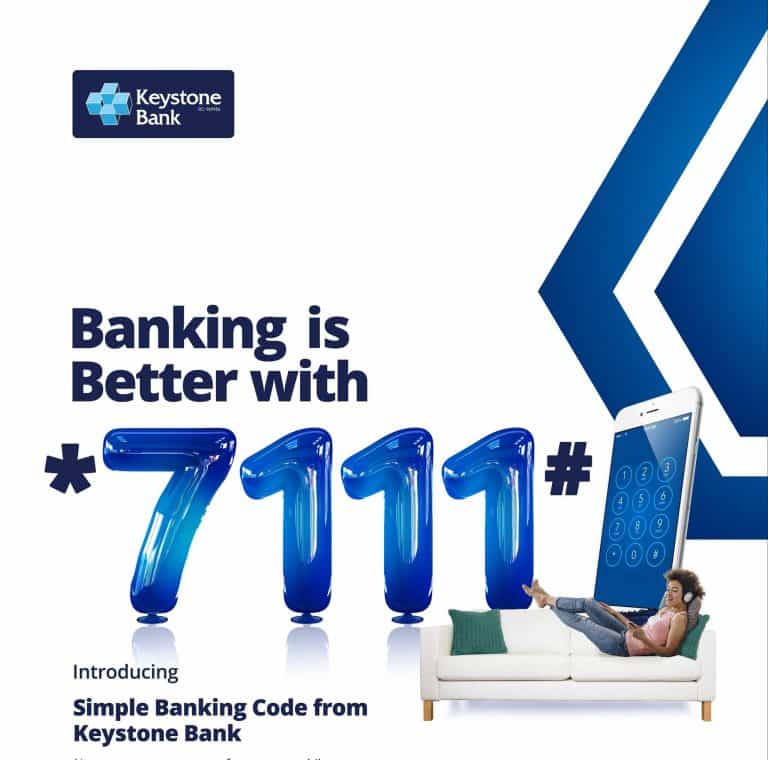
The Keystone USSD Banking Code is a short, easy-to-remember code that allows Keystone Bank customers to access a range of banking services directly from their mobile phones. By dialing the designated USSD code (*7111#), customers can conveniently perform transactions such as fund transfers, airtime recharge, balance inquiries, and more, without the need for an internet connection or mobile banking app.
keystone bank 7111 code
Benefits of Using Keystone USSD Banking Code
Utilizing the Keystone USSD Banking Code offers several advantages to customers. Some key benefits include:
Accessibility: The USSD code is available 24/7, enabling customers to perform banking transactions at their convenience, anytime and anywhere.
Convenience: With just a few taps on their mobile phones, customers can easily access a wide range of banking services without the need for internet connectivity or physical visits to a bank branch.
Time-saving: The USSD code provides a faster and more efficient way to perform banking transactions compared to traditional methods. It eliminates the need for paperwork and long waiting times, allowing customers to complete transactions swiftly.
Wide range of services: Keystone USSD Banking Code allows customers to perform various transactions such as fund transfers, airtime recharge, balance inquiries, mini statements, and more, providing comprehensive banking functionality.
How to Register/Activate for Keystone USSD Banking Code
To start using the Keystone USSD Banking Code, customers need to activate their mobile numbers with Keystone Bank. The registration process is simple and can be completed in a few steps:
Ensure that your mobile number is linked to your Keystone Bank account.
Dial *7111# from your registered mobile number.
Follow the on-screen prompts and provide the necessary information, including your account number and personal details.
Set up a unique PIN for accessing the Keystone USSD Banking Code.
Once the registration process is completed, you will receive a confirmation message, and you can begin using the Keystone USSD Banking Code for your banking needs.
Step-by-Step Guide for Transferring Funds via USSD
Transferring funds using the Keystone USSD Banking Code is a straightforward process. Follow these steps to complete a fund transfer:
Dial *7111# from your registered mobile number.
Select the “Transfer” option from the menu.
Choose the account you wish to transfer funds from.
Enter the recipient’s account number.
Provide the amount you want to transfer.
Verify the transaction details and confirm the transfer by entering your unique PIN.
You will receive a confirmation message with the details of the transaction.
Remember to ensure accuracy when entering the recipient’s account number to avoid any potential errors.
Transferring Funds to Other Banks Using Keystone USSD Code
In addition to transferring funds within Keystone Bank, the USSD code also allows customers to transfer money to accounts held in other banks. Here’s how you can transfer funds to other banks using the Keystone USSD Code:
Dial *7111# from your registered mobile number.
Select the “Transfer” option from the menu.
Choose the account you want to transfer funds from.
Enter the recipient’s account number and the bank’s code. 5. Provide the amount you wish to transfer.
Verify the transaction details and confirm the transfer by entering your unique PIN.
You will receive a confirmation message with the transaction details and reference number.
It’s important to double-check the recipient’s account number and the bank’s code to ensure the funds are transferred accurately.
USSD Banking Code for Airtime Recharge on Keystone Bank
With the Keystone USSD Banking Code, customers can easily recharge airtime on their mobile phones. Here’s how to recharge airtime using the USSD code:
Dial *7111# from your registered mobile number.
Select the “Airtime Recharge” option from the menu.
Choose the desired airtime amount or enter a custom amount.
Confirm the transaction by entering your unique PIN.
You will receive a confirmation message with the details of the airtime recharge.
This feature allows you to conveniently top up your airtime balance without the need for physical recharge cards or visiting a store.
Checking Your Account Balance with Keystone USSD Code
The Keystone USSD Banking Code provides a quick and easy method to check your account balance. Follow these steps to check your balance:
Dial *7111# from your registered mobile number.
Select the “Balance Inquiry” or “Account Balance” option from the menu.
Enter your unique PIN to authenticate the request.
You will receive a message displaying your account balance.
Regularly checking your account balance using the USSD code keeps you updated on your finances and helps you manage your funds effectively.
Keystone USSD Code for Mini Statement and Transaction History
Customers can also request a mini statement or view their transaction history using the Keystone USSD Banking Code. Here’s how:
Dial *7111# from your registered mobile number.
Select the “Mini Statement” or “Transaction History” option from the menu.
Authenticate the request by entering your unique PIN.
You will receive a message displaying the recent transactions or a statement of your account activity.
This feature provides a convenient way to review your recent transactions and monitor your account’s financial activity.
Resetting Your PIN for Keystone USSD Banking Code
If you forget your unique PIN for accessing the Keystone USSD Banking Code or want to change it for security purposes, you can easily reset it. Follow these steps to reset your PIN:
Dial *7111# from your registered mobile number.
Select the “Reset PIN” or “Change PIN” option from the menu.
Authenticate the request using your current PIN.
Follow the on-screen prompts to set a new PIN.
Confirm the new PIN to complete the process.
Ensure that your new PIN is strong and unique to maintain the security of your Keystone USSD Banking Code.
keystone bank limited
Security Measures for Keystone USSD Banking Code
Keystone Bank prioritizes the security of its customers’ financial transactions. Here are some security measures in place for the Keystone USSD Banking Code:
Unique PIN: Customers are required to set a unique PIN for accessing the USSD code, providing an additional layer of security.
PIN Confidentiality: It is crucial to keep your PIN confidential and avoid sharing it with anyone to prevent unauthorized access to your account.
Timeout Feature: To protect against unauthorized access due to inactivity, the USSD code automatically times out after a period of inactivity.
Encryption: Keystone Bank employs encryption protocols to safeguard the confidentiality and integrity of customer data during USSD transactions.
Customers are advised to remain vigilant and report any suspicious activity or unauthorized access to their accounts immediately to Keystone Bank’s customer support.
Limits and Restrictions of Keystone USSD Banking Code
While the Keystone USSD Banking Code offers convenience and flexibility, it is important to be aware of the limits and restrictions associated with its usage. Here are some key considerations:
Transaction Limits: Keystone Bank imposes certain transaction limits for security and regulatory purposes. These limits may vary depending on the type of transaction, customer profile, and regulatory guidelines. It is advisable to familiarize yourself with the specific transaction limits applicable to your account.
Daily Usage Limits: There may be daily limits on the total value of transactions you can perform using the Keystone USSD Banking Code. This limit helps protect your account from unauthorized or fraudulent activity. If you reach the daily limit, you may need to wait until the next day to perform additional transactions.
Network Coverage: To use the Keystone USSD Banking Code, you must have network coverage on your mobile device. In areas with weak or no network signal, you may experience difficulties in accessing the USSD code. It is advisable to ensure you have a reliable network connection for uninterrupted service.
Device Compatibility: The Keystone USSD Banking Code is compatible with most mobile devices, including smartphones and feature phones. However, certain older or less common devices may not support the USSD functionality. It is recommended to check the compatibility of your device with the USSD service.
Service Charges: While using the Keystone USSD Banking Code, be aware that standard service charges or fees may apply for specific transactions or requests. These charges are usually deducted from your account balance. It is advisable to familiarize yourself with the applicable charges by referring to Keystone Bank’s fee schedule or contacting customer support.
Understanding these limits and restrictions ensures a smooth and informed banking experience when using the Keystone USSD Banking Code.
Common Issues and Troubleshooting Tips for Keystone USSD Code
While the Keystone USSD Banking Code is designed to provide seamless banking services, you may encounter some common issues during its usage. Here are a few troubleshooting tips to help resolve them:
Incorrect USSD Code: Ensure that you are dialing the correct USSD code (*7111#) as provided by Keystone Bank. Double-check the code and try again if you receive an error message.
Poor Network Connectivity: If you are experiencing network issues or have weak signal strength, move to an area with better network coverage or try again later when the network conditions improve.
Incorrect PIN: Double-check the PIN you are entering to ensure accuracy. If you forget your PIN or enter it incorrectly multiple times, you may need to follow the PIN reset process provided by Keystone Bank.
Outdated Mobile Device: If you are using an older or outdated mobile device, it may not support the USSD functionality required for the Keystone USSD Banking Code. Consider upgrading your device or contacting customer support for alternative banking options.
Account-Specific Issues: If you encounter any account-specific issues or discrepancies, such as incorrect transaction details or missing funds, promptly contact Keystone Bank’s customer support for assistance and resolution.
Remember, in case of any technical or operational difficulties, Keystone Bank’s customer support team is readily available to provide guidance and address your concerns.
Benefits of Using Keystone USSD Code for Banking Transactions
The Keystone USSD Banking Code offers several benefits to customers for their banking transactions. Some key advantages include:
Accessibility: The USSD code provides access to banking services anytime, anywhere, without the need for internet connectivity or a smartphone. It ensures banking convenience for all customers, regardless of their device or location.
Efficiency: The USSD code enables quick and efficient banking transactions, allowing customers to transfer funds, recharge airtime, check balances, and perform other essential banking activities with ease and speed.
Cost-Effective: Using the USSD code eliminates the need for physical visits to the bank or other transaction channels that may incur additional costs. It reduces the need for paper-based transactions and associated charges, making it a cost-effective option for customers.
Time-Saving: With the Keystone USSD Banking Code, customers can complete banking transactions in a matter of minutes. There’s no need to wait in long queues or fill out paperwork, saving valuable time and effort.
Convenience: The USSD code allows customers to perform various banking activities directly from their mobile phones. Whether it’s transferring funds, checking balances, or recharging airtime, customers can conveniently manage their finances on the go.
Security: Keystone Bank prioritizes the security of its USSD banking services. With features like a unique PIN and encryption protocols, customers can trust that their transactions are secure and protected from unauthorized access.
Using the Keystone USSD Code for banking transactions empowers customers with greater control over their finances, providing a seamless and secure banking experience.
How to Update Personal Information via Keystone USSD Code
To ensure the accuracy of your personal information and account details, it’s essential to keep them up to date. The Keystone USSD Banking Code allows you to update certain personal information easily. Here’s how:
Dial *7111# from your registered mobile number.
Select the “Profile Update” or “Personal Information” option from the menu.
Follow the on-screen prompts to update your personal information, such as phone number, email address, or mailing address.
Verify the changes made and confirm the update by entering your unique PIN.
You will receive a confirmation message indicating the successful update of your personal information.
Regularly reviewing and updating your personal information ensures that your account details are accurate and that you can receive important notifications and updates from Keystone Bank promptly.
What is the Keystone USSD Banking Code? The Keystone USSD Banking Code is a short, easy-to-remember code that allows Keystone Bank customers to access banking services via their mobile phones.
How do I register for the Keystone USSD Banking Code? To register, dial *7111# from your registered mobile number and follow the prompts to provide the necessary information and set up your unique PIN.
What transactions can I perform using the Keystone USSD Banking Code? You can perform various transactions, including fund transfers, airtime recharge, balance inquiries, mini statements, and more.
Are there any fees or charges for using the Keystone USSD Banking Code? Standard service charges may apply for specific transactions or requests. It is advisable to refer to Keystone Bank’s fee schedule or contact customer support for detailed information.
What should I do if I forget my Keystone USSD Banking Code PIN? You can follow the PIN reset process provided by Keystone Bank to reset your PIN and regain access to the USSD banking services.
For more FAQs and detailed information, you can visit Keystone Bank’s official website or contact their customer support.
Customer Support for Keystone USSD Banking Code
Keystone Bank understands the importance of providing excellent customer support to address any concerns or queries related to the USSD banking services. If you require assistance, you can reach out to Keystone Bank’s customer support through the following channels:
Customer Support Hotline: Dial the designated customer support number to speak with a representative directly.
Email Support: Send an email to the designated customer support email address with your query or concern.
Branch Visits: Visit your nearest Keystone Bank branch for in-person assistance and guidance regarding the USSD banking services.
Keystone Bank’s customer support team is dedicated to providing prompt and reliable assistance to ensure a smooth and satisfactory banking experience for customers using the USSD banking services.
Differences Between Keystone USSD Code and Mobile Banking App
While the Keystone USSD Banking Code and the mobile banking app both offer convenient ways to access banking services, there are some key differences between the two. Here’s a comparison:
Accessibility: The USSD code can be accessed from any mobile phone, regardless of its features or internet connectivity. In contrast, the mobile banking app typically requires a smartphone with internet access.
User Interface: The USSD code operates through a menu-based system using numeric codes and prompts, while the mobile banking app offers a graphical user interface (GUI) with interactive features and visuals for a more intuitive user experience.
Transaction Options: Both the USSD code and the mobile banking app allow customers to perform various transactions such as fund transfers and balance inquiries. However, the mobile banking app often offers more advanced features, including bill payments, account statements, and customization options.
Speed and Convenience: The USSD code provides a quick and straightforward way to perform basic banking transactions, requiring minimal navigation and data input. The mobile banking app offers a more comprehensive and feature-rich experience but may involve additional steps such as app installation and login.
Data Usage: The USSD code consumes minimal data since it relies on text-based communication, making it suitable for customers with limited data plans. In contrast, the mobile banking app requires internet access and may consume more data, especially when using advanced features or loading graphical elements.
Customers can choose the option that best suits their preferences and device capabilities, whether it’s the simple and accessible USSD code or the comprehensive features of the mobile banking app.
Exploring Additional Services Offered via Keystone USSD Code
In addition to basic banking transactions, the Keystone USSD Banking Code may provide access to additional services depending on the bank’s offerings. Here are some common additional services you may explore:
Bill Payments: You may be able to pay utility bills, mobile phone bills, and other service bills directly through the Keystone USSD Banking Code. Simply select the bill payment option from the menu and follow the prompts to complete the payment.
Account Services: Some USSD codes offer options for account-related services such as requesting checkbooks, stopping cheques, updating KYC (Know Your Customer) information, and linking accounts.
Savings and Investments: Depending on the bank’s offerings, you might be able to open a savings account, fixed deposit, or invest in mutual funds through the USSD code. Check the menu options for available savings and investment services.
Loan Services: Some USSD codes provide access to loan-related services, such as checking loan eligibility, applying for loans, and tracking loan applications. These services can simplify the loan management process for customers.
It’s important to note that the availability of additional services may vary depending on the specific features and offerings of Keystone Bank. Explore the USSD code menu to discover the range of services available to you.
Privacy Policy and Data Protection for Keystone USSD Code
Keystone Bank is committed to protecting the privacy and data of its customers. When using the USSD code, customers can trust that their personal and financial information is handled securely and in accordance with relevant data protection laws.
Here are some key aspects of Keystone Bank’s privacy policy and data protection measures:
Data Confidentiality: Keystone Bank maintains strict confidentiality of customer data and ensures that personal and financial information is accessible only to authorized personnel for legitimate purposes.
Secure Data Transmission: The USSD code transactions are encrypted to protect the confidentiality and integrity of customer data during transmission. This ensures that sensitive information remains secure and protected from unauthorized access.
Consent and Authorization: Keystone Bank adheres to regulatory requirements for obtaining customer consent and authorization before accessing and processing personal information.
Data Retention and Usage: Keystone Bank retains customer data for the period required by applicable laws and regulations. Personal information is used only for the purposes specified, such as providing banking services and complying with legal obligations.
Compliance with Regulations: Keystone Bank complies with data protection and privacy regulations, including the General Data Protection Regulation (GDPR) where applicable, to safeguard customer data and ensure lawful processing.
Third-Party Service Providers: In certain cases, Keystone Bank may engage third-party service providers to deliver specific services. These providers are selected based on their ability to maintain the same level of data protection and security as Keystone Bank.
Customer Rights: Keystone Bank respects customer rights regarding their personal data, including the right to access, correct, and delete personal information. Customers can exercise these rights by contacting Keystone Bank’s customer support.
To learn more about Keystone Bank’s privacy policy and data protection practices, you can visit their official website or refer to their privacy policy document.
Enhancements and Updates to Keystone USSD Banking Code
Keystone Bank continuously strives to enhance the USSD banking experience for its customers by introducing new features and updates. These enhancements aim to improve usability, security, and the range of services available. Some recent and potential future enhancements include:
Expanded Service Offerings: Keystone Bank may introduce new services and features to the USSD code, such as international funds transfer, cardless withdrawals, and integration with emerging payment systems.
Biometric Authentication: To enhance security, Keystone Bank might explore integrating biometric authentication methods, such as fingerprint or facial recognition, into the USSD banking services.
Personalized Notifications: Customers may receive real-time notifications regarding their account activities, such as transaction alerts, low balance alerts, and promotional offers, to stay informed about their financial transactions.
Enhanced User Interface: Keystone Bank may introduce a more intuitive and user-friendly interface for the USSD code, making it easier for customers to navigate through menu options and perform transactions.
Voice Interaction: Future updates to the USSD code could incorporate voice-based interaction, allowing customers to navigate menus and complete transactions using voice commands.
Keystone Bank is committed to leveraging technology and customer feedback to enhance the USSD banking experience, ensuring that customers have access to a secure, convenient, and efficient banking platform.
The Keystone USSD Banking Code has revolutionized the way customers engage in banking transactions, providing accessibility, convenience, and security. By leveraging this innovative service, customers can transfer funds, recharge airtime, check balances, and perform various other banking activities with ease. The step-by-step registration and transaction process ensures a seamless user experience, supported by Keystone Bank’s robust customer support.
While using the USSD code, customers should be aware of its limits, security measures, and potential troubleshooting tips. They can enjoy the benefits of cost-effective and time-saving banking transactions, regardless of their device or internet connectivity. Furthermore, Keystone Bank continually updates and enhances the USSD banking services to deliver a superior banking experience, expanding service offerings, improving security, and embracing technological advancements.
As technology continues to advance, the Keystone USSD Banking Code remains a reliable and efficient option for customers seeking convenient and secure banking services. With its widespread availability and range of features, the USSD code empowers customers to take control of their finances and manage their banking needs anytime, anywhere.
Stanbic IBTC Bank is a leading financial institution in Nigeria, offering a wide range of banking services to its customers. One of the convenient features provided by Stanbic IBTC Bank is the transfer of funds using a USSD code. USSD (Unstructured Supplementary Service Data) codes allow customers to perform various banking transactions directly from their mobile phones, without the need for an internet connection. In this article, we will explore the Stanbic IBTC transfer code and how customers can use it to transfer money easily and securely.
Stanbic IBTC Transfer Code – How It Works
The Stanbic IBTC transfer code is a USSD code that enables customers to initiate fund transfers from their Stanbic IBTC Bank accounts. By dialing the designated code from their registered mobile numbers, customers can conveniently transfer money to other bank accounts within Nigeria. This service is available 24/7, providing customers with flexibility and accessibility.
How to Register for Stanbic IBTC Transfer Code
Before using the Stanbic IBTC transfer code, customers need to register for the service. To register, follow these simple steps:
Ensure your mobile number is linked to your Stanbic IBTC Bank account.
Dial *909# on your registered mobile number.
Follow the on-screen prompts to create a transfer PIN.
Once registered, you can start using the Stanbic IBTC transfer code.
How to Transfer Funds Using Stanbic IBTC Transfer Code
To transfer funds using the Stanbic IBTC transfer code, follow these steps:
Dial *909# on your registered mobile number.
Select “Transfers” from the menu options.
Choose “Transfer to Other Banks” if you wish to send money to accounts in other banks.
Enter the recipient’s bank account number.
Input the transfer amount.
Confirm the transaction details.
Enter your transfer PIN to authorize the transaction.
The funds will be transferred to the recipient’s account instantly.
Stanbic IBTC Transfer Code – Additional Features
Aside from fund transfers, the Stanbic IBTC transfer code offers additional features for enhanced banking convenience. These features include:
1. Airtime Purchase
Customers can use the Stanbic IBTC transfer code to buy airtime for themselves or others. By dialing the code and selecting the appropriate option, customers can top up their phone credit or send airtime to friends and family.
2. Balance Enquiry
Customers can check their account balance using the Stanbic IBTC transfer code. By selecting the balance enquiry option and entering their transfer PIN, customers can view their account balance on their mobile screens.
3. Mini Statement
The Stanbic IBTC transfer code also allows customers to request a mini statement of their recent transactions. By selecting the mini statement option and entering their transfer PIN, customers can access information about their last few transactions.
4. Bill Payments
Customers can conveniently pay bills using the Stanbic IBTC transfer code. With this feature, customers can settle utility bills, make DSTV or GOtv payments, and even pay for their internet services.
Security Measures for Stanbic IBTC Transfer Code
Stanbic IBTC Bank prioritizes the security of customer transactions. To ensure the safety of using the transfer code, the bank advises customers to:
Keep their transfer PIN confidential.
Regularly change their transfer PIN to prevent unauthorized access.
Be cautious when using the transfer code in public spaces and shield their mobile screens from prying eyes.
Immediately report any suspicious activities or unauthorized transactions to the bank.
Conclusion
The Stanbic IBTC transfer code provides a convenient and efficient way for customers to perform various banking transactions on the go. Whether you want to transfer money, check your account balance, or pay bills, the transfer code offers a user-friendly platform to carry out these tasks effortlessly. Take advantage of the Stanbic IBTC transfer code to experience hassle-free banking and enjoy the convenience it offers in managing your finances.
With the Stanbic IBTC transfer code, banking has never been easier. Enjoy the benefits of mobile banking and stay in control of your finances with just a few simple steps. Remember to keep your PIN secure and follow the on-screen prompts carefully for a smooth banking experience. Embrace the convenience of the Stanbic IBTC transfer code and enjoy seamless transactions anytime, anywhere.
In Nigeria, mobile banking has become increasingly popular due to its convenience and accessibility. One of the most common features of mobile banking is the ability to transfer money using USSD codes. USSD (Unstructured Supplementary Service Data) codes are short, easy-to-remember sequences of numbers that allow users to perform various banking transactions directly from their mobile phones, without the need for an internet connection. In this article, we will provide a comprehensive list of all the major banks in Nigeria and their corresponding USSD money transfer codes.
We are going to show you the different banks in Nigeria money transfer codes like; Access Bank mobile money transfer code, Diamond Bank mobile money transfer code, EcoBank mobile money transfer code, Fidelity Bank mobile money transfer code, First Bank mobile money transfer code, FCMB mobile money transfer code, GTBank mobile money transfer code, Heritage Bank mobile money transfer code, Keystone Bank mobile money transfer code, Stanbic IBTC Bank mobile money transfer code, Skye Bank mobile money transfer code, Sterling Bank mobile money transfer code, UBA mobile money transfer code, Union Bank mobile money transfer code, Unity Bank mobile money transfer code, Wema Bank mobile money transfer code and Zenith Bank mobile money transfer code.
Access Bank USSD
To transfer money from your Access Bank account to another account in any bank in Nigeria, dial *901*Amount*Account Number#.
For interbank transfers, dial *901*Amount*Account Number# and select the recipient’s bank.
Follow the on-screen prompts to complete the transaction.
First Bank USSD
To transfer money from your First Bank account to another account in any bank in Nigeria, dial *894*Amount*Account Number#.
Follow the on-screen prompts to complete the transaction.
GTBank USSD
To transfer money from your GTBank account to another GTBank account, dial *737*1*AmountAccount Number#.
For transfers to other banks, dial *737*2*AmountAccount Number#.
Follow the on-screen prompts to complete the transaction.
Zenith Bank USSD
To transfer money from your Zenith Bank account to another account in any bank in Nigeria, dial *966*Amount*Account Number#.
Follow the on-screen prompts to complete the transaction.
Wema Bank USSD
Wema Bank has decided to make transferring money and carrying out other financial activities a lot easier for its customers by providing the *945# code.
Dial *945*BENEFICIARYACCOUNTNUMBER*AMOUNT# to transfer money from your Wema Bank account to any bank account. You can also check your account balance, by simply dialing *945*0# and you can change your transfer by dialing *945*00#.
You can also buy airtime for your Alartz number by simply dialing *945*AMOUNT#.
Unity Bank USSD
Dial *389*215# to get started with Unity Bank’s Mobile Banking. You can also carry out various financial transactions such as one-on-one money transfers, utility payments, bills and goods payments, airtime recharge, etc.
UBA Money USSD
We can’t forget to add UBA to the list of Nigerian Bank’s Mobile Banking USSD Code for Money Transfer. United Bank of Africa (UBA) is one of the most reliable and oldest in the country. UBA mobile banking offers an easy way to carry out various financial transactions like money transfers, airtime recharge, bill payments, etc.
To carry out any financial transaction dial *919# from the number registered or linked to your UBA account.
EcoBank USSD
To transfer money from your EcoBank account to another account in any bank in Nigeria, dial *326*Amount*Account Number#.
Follow the on-screen prompts to complete the transaction.
Union Bank USSD
To transfer money from your Union Bank account to another account in any bank in Nigeria, dial *826*Amount*Account Number#.
Follow the on-screen prompts to complete the transaction.
Fidelity Bank USSD
Dial *770# on your phone and follow the on-screen instructions to get started. Fidelity bank to another bank account money transfer dial *770*Reciever’s Account number*Amount# e.g. You will need the last 4 digits of your ATM card to authenticate the transaction. Note that the daily transfer limit is N20,000.
To buy airtime for yourself, dial *770*amount#. While to buy airtime for family and loved ones, dial *770*Beneficiary Phone no*Amount#. The airtime recharge daily limit is ₦5,000 Naira.
Stanbic IBTC USSD Bank Money Transfer Code
You can carry out lots of financial transactions like salary payments, one-on-one money transfers, airtime recharge, bills, and goods payments with the Stanbic IBTC Bank money transfer code. Simply dial *909# to get started
You can also buy airtime on your mobile phone by dialing *909*amount#. The daily limit is 5000 naira.
Sterling Bank USSD Code
With *822# Sterling Bank USSD code, you can carry out various transactions, all you have to do is dial *822# to create a PIN that will be needed to authenticate transactions. You will be charged N5 for every transaction.
Skye Bank USSD
With Skye Bank’s USSD mobile money transfer code, you can carry out various transactions like airtime recharge, salary payments, one-on-one money transfers, bills, and goods payments can be done. Dial *833# to get started.
Standard Chartered Bank Money USSD
You must have a phone number that is registered or linked to your Standard Chartered Bank account in other to use the code.
To register for the Standard Chartered Bank transfer code
Dial *120*2345#. Then dial 1 to continue your registration.
They will also ask you to type in your Debit Card number.
Type in your ATM PIN.
Enter full ID Number.
Accept their terms and conditions then proceed to create a new PIN.
Input your new PIN from the next on-screen instruction.
You will see a welcome message on a new screen. Press 1 to continue banking.
First City Monument Bank (FCMB) USSD
As an FCMB customer, all you have to is dial *389*214# from your mobile phone. A welcome message will display alongside three options.
1. Activate with a card,
2. Activate with Account,
3. and Activate with Mwallet.
Select option 2 to activate with your account number. After that, call FCMB Contact Centre with this number 01-2798800 in other to create a PIN for your transactions that will be sent within minutes.
Then dial *389*214# on your mobile phone, go to Security then choose Change PIN from the on-screen instructions. Type in the default PIN sent to you, then enter your desired new 4-digit PIN. You can now use the *389*214# for subsequent transactions.
Keystone Bank USSD Money USSD
Keystone Bank is another bank that made it to the list of Nigerian Banks Mobile Banking USSD Code for Money Transfer. In other to transfer money from your Keystone Bank account to another bank account, simply dial *322*082# then follow the on-screen prompts in other to complete your transaction.
Diamond Bank USSD
Diamond Bank is in partnership with MTN. For a customer to use Diamond Bank USSD for transfer, you must have a “Diamond Y’ello Account”. This is an account that combines both telecommunication and financial services, also coupled with a loyalty scheme that active MTN customers (targeted mainly at mass market and Youths) can easily subscribe to from their phones in accordance with CBN Financial Inclusion Strategy by simply dialing *710#
To send money to any bank in Nigeria, just dial *710*777*RECIEVER’S ACCOUNT NO*AMOUNT*PIN#. For Diamond Y’ello to Y’ello money transfer simply dial *710*710*PHONE NO*AMOUNT*PIN#. While you have to dial *710*556*PIN# to check your account balance.
To buy airtime for your phone, just dial *710*555*PHONE NO*AMOUNT*PIN#
Conclusion
Mobile banking has revolutionized the way we handle financial transactions, and USSD money transfer codes have made it even more convenient for Nigerians to transfer money on the go. By knowing the USSD codes for your respective bank, you can easily perform transfers without the need for internet access or visiting a physical branch. However, it’s important to note that transaction fees may apply, and it’s advisable to double-check the codes and follow the instructions carefully to avoid any errors.
Let’s skip the formalities and get straight down to the business of the day which is; How to Transfer Money To Any Nigeria Bank with the Heritage Bank Transfer Code.
This post is going to show you the proper Heritage Bank Mobile Transfer Code for transferring money from your Heritage Bank to any other bank on your mobile device and the best part of it is that you don’t even need an internet connection for this.
Good news, Heritage bank currently supports fund transfers using the USSD code on your phone. And when I say your phone, I mean any mobile phone (whether Android, Windows, iOS, etc), and the best part of it all is that you can transfer money even without an internet connection and at any time of the day.
To send money, dial the USSD code on your phone number. The Heritage Bank Transfer Code works on different networks, whether MTN, 9Mobile (Etisalat), Airtel, Glo, Smile, Ntel, etc It is also important to know that the code must be dialed on the number linked with your account,
Heritage Bank Transfer Code
Heritage to another Heritage Bank Money Transfer (Intrabank money transfer).
Interbank money transfer, that is Heritage to another bank Money Transfer
Heritage Bank Transfer Code — How To Transfer Money From Your Heritage Bank To Other Banks On Mobile Phone
heritage bank
Here are the steps you need to take if you want to transfer money from your Heritage Bank to another bank using the Heritage Bank USSD Money Transfer Code;
Just dial *322*030*Reciever’s Account Number*Amount# and follow the on-screen instructions to complete your transaction. For instance, dial *322*030*1203456879*5000# to transfer N5000 naira. If this method poses to be difficult for you or for some reason you don’t want to use this method, then below is another way that you can still carry out your transfer.
Heritage Bank Money Transfer Via Heritage Mobile App
The Heritage Mobile application is another way that you can transfer money. Must Heritage Bank customers prefer using this method to send money because it’s more reliable than the aforementioned? Below are steps to transfer money with the Heritage mobile application:
Here is where we draw the curtain on the subject of How to Transfer Money To Any Nigeria Bank with Heritage Bank Mobile Transfer Code. We will be glad to know if this article was helpful in any way. But if it wasn’t, please let us know how we can improve it for a better user experience. Thanks for stopping by.
Skye Bank, currently known as the ‘Polaris Bank’ USSD Code features things like the Polaris Bank transfer code, Polaris Bank airtime recharge code, and Polaris Bank account balance code.
The Polaris Bank mobile banking USSD code is not just limited to the three features mentioned above, it’s because they are the most used Polaris Bank USSD code.
There are two ways to use Polaris Bank mobile banking, one is through the use of the Polaris Bank USSD Code and the second is through the use of the mobile app.
But, in this article, we will be focusing on Polaris Bank USSD Code and how to use it for various transactions like transferring money, buying airtime, checking your account balance, and more.
The Polaris Bank mobile banking USSD code is quite different from its mobile app. It does not require you to access the internet and it perfectly works on any mobile phone that can receive and make calls. To crown it all the Polaris Bank mobile banking USSD code is easy to use, fast, and available 24/7 even on holidays and weekends.
polaris bank
If you are the type that roams with your Alartz number, even if it’s Mtn, Glo, Airtel, or 9mobile, you can still make transactions with the Polaris Bank mobile banking USSD code, even when you are outside Nigeria.
Polaris Bank Mobile Banking Code ~ *833# Various Features.
Funds Transfer.
Check Account Balance.
Airtime Recharge.
Update BVN Profile.
Pay with MasterPass.
Bills Payment.
Hotlist Debit Card.
Open an Account.
Note: Polaris Bank is occasionally adding more features to Polaris Bank Smart banking and we will constantly update this article to reflect any changes made.
How to Register or Activate Your Polaris Bank *833#Mobile Banking.
Before you can start making use of the Polaris mobile banking platform you will have to first register and create your transaction PIN on the platform. To register simply follow the steps below:
Dial *833#,
Choose number 6 to check the account balance,
Type in your account number,
Generate any 4-digit transaction PIN of your choice that will be used to complete transactions on the platform,
If your balance is displayed, then you are successful with the registration.
Polaris Bank Mobile Transfer Code: Polaris 2 Polaris Money Transfer & Polaris 2 Other Banks.
With the Polaris Bank transfer code, you can transfer money from your Polaris Bank to another Polaris Bank account or from your Polaris Bank to a different bank in Nigeria like GTBank, Ecobank, etc. And there are actually two ways you can do this, by the direct or indirect use of the Polaris Bank mobile transfer code.
How To Transfer Using The Direct Polaris Bank Mobile Transfer Code
Dial *833*Amount*Receiver’s Account Number# using the phone number linked or registered to your Polaris Bank account.
Complete the transaction using your transaction PIN.
You will finally be notified of a successful or failed transaction.
How To Transfer Using The Indirect Polaris Bank Mobile Transfer Code
Dial *833# on your Alartz number.
Enter 3 to transfer funds.
Type in Amount.
Receiver’s bank.
Receiver’s Account number.
Enter your PIN.
Polaris Bank Airtime Recharge Code ~ For Self & Others
For Self Recharge ~ Dial *833*Amount# and in a few seconds you will receive your airtime.
Recharge For Others ~ This is to buy airtime for any number that is not your Alartz number. To do this just dial *833*Amount*Receiver’s Phone Number#. Finally, complete the transaction by using your authentication PIN.
How To check your Balance Via The Polaris Bank Account Balance Code.
To check how that is still left in your Polaris bank account simply dial *833*6# and you will receive your account balance details shortly, but you will be charged 10 Naira for this transaction.
Polaris Bank Daily Limit & Charges.
Limit On Transfer ~ Maximum of N50,000 daily.
Limit On Airtime Recharge ~ N5,000 daily and N20,000 monthly.
Charges On Transfer ~ Polaris Bank to other banks is 52.5 Naira, while Polaris Bank to other banks is 10.5 Naira.
Network Charges ~ 1 – 5 Naira per transaction. You can’t carry out any transaction if don’t have any airtime.
Other Polaris Bank USSD Codes.
To Open An Account ~ *833*1#.
To Pay with MasterPass ~ *833*7#.
For Bills Payment, ~ *833*2# then follow the on-screen prompt.
Hotlist ATM Card ~ *833*4# then follow the on-screen instruction.
To Change Your PIN ~ *833# >> 9 or * >> 1 to change PIN.
Note: To be able to reset your PIN, you will have to contact the Polaris Customer care agent and you can do that by using any of the phone numbers that have been provided below.
In an effort to enhance convenience for its customers, Diamond Bank has introduced the Diamond Bank Mobile App. This user-friendly application caters to individuals who hold savings, domiciliary, or current accounts with Diamond Bank. However, many people are unaware of the process to download and register for this platform. Therefore, we have created this informative article titled “How to Download & Register for the Diamond Bank Mobile App on Android & Other Devices” to guide you through the necessary steps.
Though most people don’t know where or how to download and register for this platform, and that is why we have decided to come up with this article ‘How To Download & Register Diamond Bank Mobile App On Android & All Gadgets’.
The Diamond Bank Mobile App brings a host of benefits to its users. By downloading and registering on this app, you gain access to a range of convenient banking services at your fingertips. Whether you want to check your account balance, transfer funds, pay bills, or manage your finances on the go, the Diamond Bank Mobile App offers a comprehensive suite of features to simplify your banking experience.
diamond bank mobile
The Diamond Mobile app has now been refurbished with some amazing features that are sure to take you to a whole new realm of experience. With the Diamond Mobile app, comes a faster, better, and smarter banking experience.
The App is not limited to just banking services, it also comes with lifestyle solutions that really make your banking experience an exciting one. Below are the various activities that you can carry out with the Diamond Bank Mobile app.
AVAILABLE FEATURES ON THE DIAMOND MOBILE APP
Airtime Top-up and Bill payments
Events and Movie Tickets Purchase (Movie preview also available)
Search, book, and Pay for International and Local flights
Funds Transfer within and outside Diamond Bank
Konga Wallet Top-up
Credit card repayments
Account statement request
Switch on/off Debit cards
Diamond Money Transfer
Blackberry BIS Subscription
Cheque services (Confirm or Stop cheque and New cheque request)
Maintain/Manage beneficiaries for Bills Payments and Funds Transfer
HOW TO INSTALL & REGISTER DIAMOND MOBILE APP FOR INTERNET BANKING
Secondly, The Diamond Mobile app icon will automatically appear on your device Download.
Thirdly, Open the App and click on ‘Register’.
The fourth step is, Go through the Terms and Conditions and Accept them.
The fifth step, Then follow the 3 simple steps below to Register for the Diamond Mobile App:
i) First, you will have to enter your diamond online user ID also known as the Internet Banking User ID or the 16-Digit debit card number, and any of your account numbers. A 4-digit registration code will be created and sent to you via an SMS on your registered phone number (even if you used the debit card number, your user Id will also be sent in the same SMS).
ii) Enter the diamond online user ID and/or registration code and select submit.
iii) Select any password of your choice that should be up to or more than 6 characters and re-confirm it.
iv) choose a 4-digit PIN that will be used to authenticate any transaction you carry out, reconfirm the PIN, and select confirm. After you have successfully completed the registration, you can now start using the Diamond mobile app.
This is where we call it a day with the Diamond Bank Mobile App. We hope this post was able to answer your questions, How do I download the Diamond Bank Mobile App? How do I Register for Diamond Bank Mobile App? or How to install the Diamond Bank Mobile App? If it did, then you can help this post to reach more people by sharing it.
The Diamond Bank Mobile App revolutionizes the way you bank, offering unparalleled convenience and flexibility. By following the steps outlined in this article, you can effortlessly download and register for the app, enabling you to manage your Diamond Bank accounts with ease. Embrace the power of mobile banking and enjoy a seamless banking experience anytime, anywhere. Discover the convenience of the Diamond Bank Mobile App today and take control of your finances in the palm of your hand.
List of First city monument bank (FCMB) Sort Codes and Branches in Nigeria – This article is about the List of First city monument bank (FCMB) Sort Codes and branches in Nigeria. The sort code is a number that usually identifies the bank and the branch where an account is held. the sort code identifies the bank. The sort code is usually used when transferring funds from one account in one bank branch to another branch of the bank or another bank.
Sort code for all First city monument bank (FCMB) in Nigeria – Sort Code listed by City & State.
Here is a list of all First city monument bank (FCMB) sort codes in Nigeria:
SORT CODES
BRANCHES
214010077
UYO
214010022
EKET
214010051
ORON ROAD UYO
214010064
WELLINGTON BASSEY (UYO)
214010035
IKOT ABASI
214010048
IKOT EKPENE
214010019
STATE HOUSE OF ASSEMBLY UYO
214020012
ONITSHA
214030028
GOMBE
214030015
BAUCHI
214040012
BENIN
214040021
BENIN AKPAPAKPA
214040034
EFFURUN ROAD
214040063
BENIN UGBOWO
214050011
MAKURDI
214050037
LAFIA
214060014
MAIDUGURI
214060027
DAMATRU
214060030
POTISKUM
214070017
CALABAR, CALABAR RD
214070020
IKOM
214080023
ABUJA GARKI
214080023
OGBOMOSHO STREET
214080036
AREA 3
214080049
MAITAMA FEDSEC
214080078
LOKOJA
214080081
WUSE 2
214080094
OBAJANA
214090013
WARRI
214090026
ASABA
214090039
YOLA
214090026
JALINGO
214100013
ABA
214100026
ABA FAUKS RD
214100042
UMUAHIA
214100055
OWERRI
214110029
KADUNA 2
214110016
KADUNA AHMADU BELLO WAY
214110032
ZARIA
214120019
KANO
214120022
BELLO RD
214120048
DUTSE
214130012
KATSINA
214140015
ILORIN
214150018
HEAD OFFICE
214150021
VICTORIA ISLAND
214150225
APAPA 1
214150047
IKEJA
214150050
IDUMAGBO
214150092
IPONRI
214150076
ADEOLA ODEKU
214150063
ALABA
214150089
AWOLOWO
214150209
ALAGBADO
214150173
ALLEN
214150403
OKE ARIN 2
214150102
OTTA
214150131
AJAH
214150270
AKUTE
214150160
IDUMOTA
214150186
BROAD STREET
214150306
AIRPORT RD
214150034
COMMERCIAL ROAD APAPA
214150283
IKORODU
214150212
IKEJA MOTORWAY
214150296
OJO
214150429
EKWULOBIA
214150241
SANUSI FAFUNWA
214150364
MUSHIN
214150351
AKOWONJO
214150377
ADENIRAN OGUNSANYA SURULERE
214150128
IKEJA OGBA
214150115
YABA OJUELEGBA
214150380
THE PALMS
214150393
MATORI
214150416
LEKKI 2
214150445
TINCAN
214150458
KETU
214150461
ADEOLA HOPEWELL
214150487
AGEGE
214150474
AGBARA
214150490
ORILE
214150500
MACARTHY
214150513
SHOMOLU
214150526
IDIMU
214150555
ADETOKUNBO ADEMOLA
214160011
MINNA
214170014
IJEBU ODE
214170027
ABEOKUTA
214170043
AGO IWOYE
214170030
SAGAMU
214170056
IJEBU IGBO
214180017
AKURE
214180020
ADO EKITI
214180046
OWO
214180059
ORE
214180062
IGBOKODA
214190023
IBADAN(GBAGI)
214190023
BODIJA
214190036
OSOGBO
214190049
UCH
214190052
ILESHA
214190065
SHAKI
214190081
OJOO
214210013
PORT HARCOURT
214210026
OLU OBASANJO WAY
214210039
YENEGOA
214210055
MIDAS PORT-HARCOURT
214210068
IKWERRE ROAD
214210042
TRANS AMADI
214210071
OYIGBO(PH)
214210084
ABULOMA
214210097
AGRREY ROAD
214220010
JOS
214220016
BIRNI KEBBI
214220029
GUSAU
214220032
SOKOTO
214250028
ONITSHA NEW MARKET
214250015
ENUGU
214250028
GARDEN AVENUE
214250044
AWKA
214250060
ABAKALIKI
214250028
NNEWI
214150568
MARINA
First city monument bank (FCMB) Sort Codes and Branches in Nigeria 2026
If you have ever conducted international or domestic wire transfers, you might have heard of SWIFT codes and routing numbers. Both SWIFT codes and routing numbers are used to identify banks during financial transactions, but they serve different purposes. In this article, we will explore the differences between SWIFT codes and routing numbers.
What is a SWIFT Code? Definition, Format, and Function
A SWIFT code is a unique identifier assigned to banks and financial institutions worldwide. It stands for Society for Worldwide Interbank Financial Telecommunication. SWIFT codes are used to facilitate international wire transfers by identifying the recipient bank, country, and branch. The code consists of eight to eleven characters, and it is structured as follows:
The first four characters are the bank code
The next two characters represent the country code
The next two characters are the location code
The final three characters are the branch code (optional)
For example, the SWIFT code for JPMorgan Chase Bank in New York is CHASUS33. In this case, CHAS represents the bank code, US is the country code, 33 represents the branch code, and the location code is omitted.
What is a Routing Number? Definition, Format, and Function
A routing number, also known as an ABA routing number or RTN, is a nine-digit code used to identify banks in the United States. Routing numbers are used to process domestic wire transfers, direct deposits, and other transactions. The code is structured as follows:
The first four digits represent the Federal Reserve routing symbol
The next four digits represent the ABA institution identifier
The final digit is the check digit
For example, the routing number for JPMorgan Chase Bank in New York is 021000021. In this case, 021000021 represents the routing number, where 021 is the Federal Reserve routing symbol and 00021 is the ABA institution identifier.
Key Differences Between SWIFT Codes and Routing Numbers
The main differences between SWIFT codes and routing numbers are:
Function: SWIFT codes are used for international wire transfers, while routing numbers are used for domestic transactions.
Length: SWIFT codes are between eight to eleven characters long, while routing numbers are nine digits long.
Structure: SWIFT codes have a fixed structure of bank, country, location, and branch codes, while routing numbers have a specific structure of Federal Reserve routing symbol, ABA institution identifier, and check digit.
International use: Routing numbers are only used in the United States, while SWIFT codes are used worldwide.
When to Use a SWIFT Code vs Routing Number: Examples and Scenarios
If you are sending money to a bank outside of the United States, you will need the bank’s SWIFT code. The SWIFT code will ensure that the money is sent to the correct recipient bank and branch. On the other hand, if you are sending money domestically within the United States, you will need the recipient bank’s routing number. The routing number will ensure that the money is sent to the correct bank and account.
It is important to note that some banks may have multiple SWIFT codes or routing numbers depending on their location and branch. Always confirm the correct code or number with the recipient bank before initiating any financial transactions.
In conclusion, SWIFT codes and routing numbers are essential bank identifiers used in financial transactions. SWIFT codes are used for international wire transfers, while routing numbers are used for domestic transactions. SWIFT codes have a fixed structure of bank, country, location, and branch codes, while routing numbers have a specific structure of